The NanoVNA Tuning Procedure, Step by Step
A quick recap in case you are landing here first. A radio needs its antenna to look like 50 ohms, or part of the signal echoes back instead of radiating. A small network of capacitors and an inductor makes that happen, and it also blocks the harmonics an amplifier produces. Two measurements describe how well it is working: S11, the echo that bounces back, and S21, the signal that passes through. This article is the hands-on part: how to actually tune the network on the bench.
The Smith chart, in three landmarks
Tuning is much easier if you can read a Smith chart, and a Smith chart is far less intimidating than it looks. It is a round plot, and you only need to know a few spots on it.
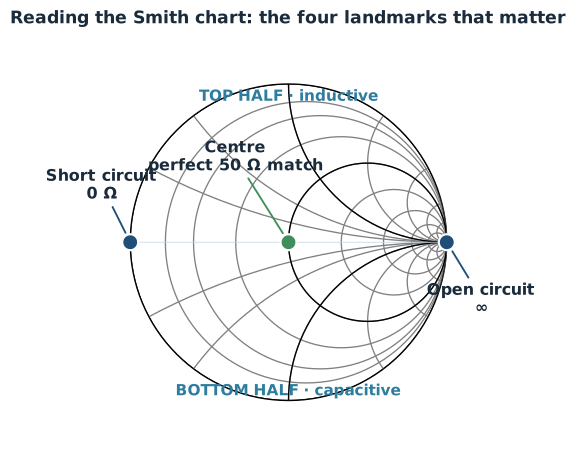
The very centre is a perfect 50 ohm match, which is where you want to end up. The far left edge is a dead short, the far right edge is an open circuit. The top half means your circuit looks a little like an inductor at that frequency, and the bottom half means it looks a little like a capacitor. That is genuinely enough to tune by. As you change a component, a dot moves around this chart, and your goal is simply to walk that dot toward the centre.
Why calibration is not optional
Here is the step most people skip, and then wonder why their readings make no sense. A NanoVNA does not magically measure your circuit. It measures everything between itself and your circuit, including the cable and any short wire you solder on to reach the board. At radio frequencies even a few centimetres of cable changes the picture a lot.
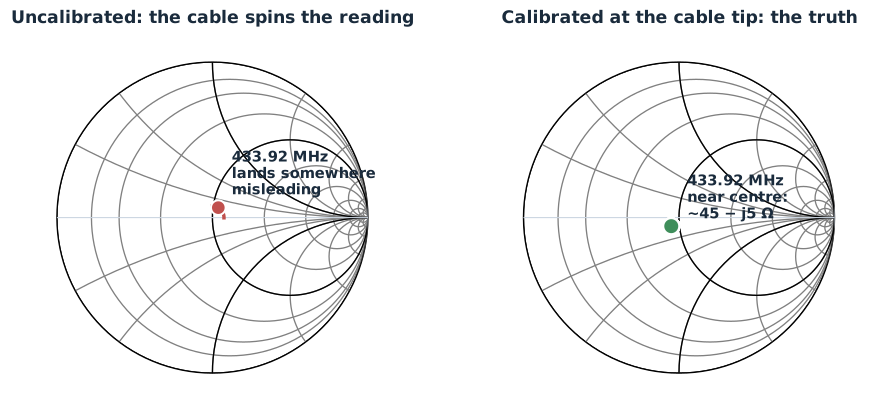
Calibration tells the instrument where your circuit actually begins. You do it by connecting three known things, in turn, at the exact point you care about: a short, an open, and a 50 ohm load. From those three the NanoVNA works out how to subtract the cable's effect. Skip it, or do it at the wrong place, and the cable rotates every reading around the chart, so a circuit that needs more capacitance can look like it needs the opposite.
Two practical notes. Calibrate at the tip of the wire that touches your board, not at the NanoVNA's own socket, because it is the whole path you want corrected. And you genuinely need all three standards, not only the short and open, because the load is what fixes the error that matters most near the centre of the chart, which is exactly where you are aiming. A plain 49.9 ohm resistor with one percent tolerance is a perfectly good load at these frequencies, so this costs almost nothing.
The bench setup
With calibration understood, here is how the bench looks for tuning the match.
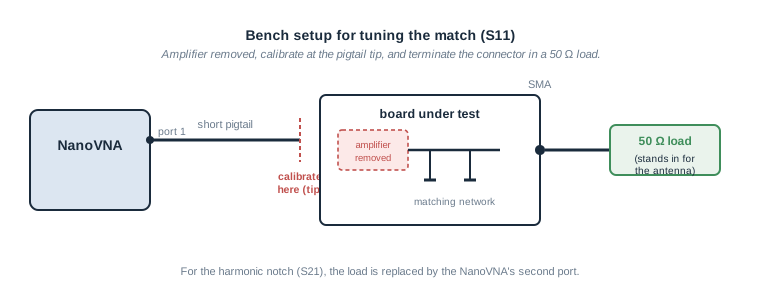
The amplifier comes off the board, or is otherwise disconnected, because even switched off it would load the circuit and spoil the reading. A 50 ohm load goes on the antenna connector. This matters: the network transforms whatever is on the connector side, so during tuning the connector must carry the same 50 ohms a good antenna would present in real use. Measure with the connector left open and every number is meaningless.
The procedure, in the right order
The order matters, so follow it.
First, place the harmonic block using S21. Connect the second port of the NanoVNA to the antenna connector and look at S21 across a wide range. You will see a deep dip where the trap is blocking. Change the trap capacitor until that dip sits exactly on the harmonic you want to kill. Do this first because the trap capacitor also nudges the match at the working frequency, so settling it early saves you redoing work later.
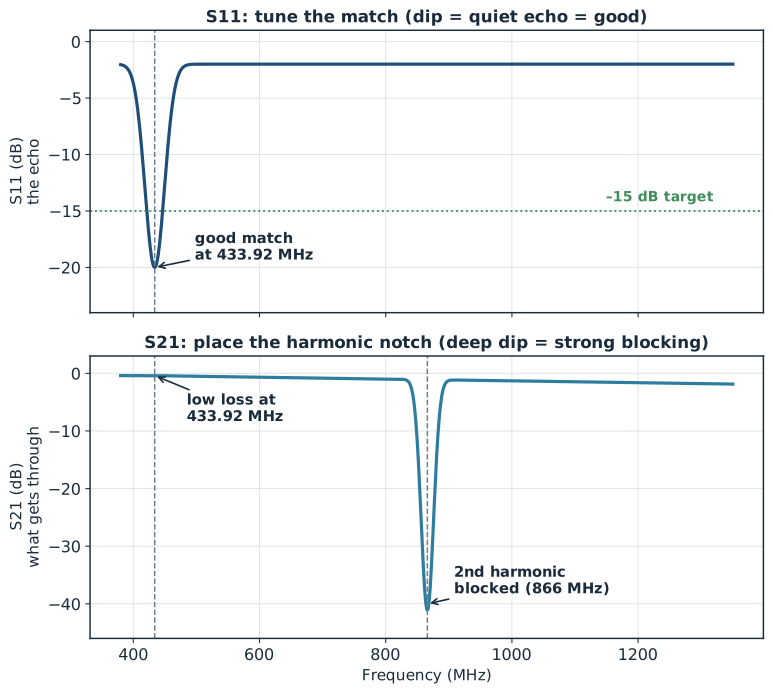
Then centre the match using S11. Put the 50 ohm load back on the connector and switch to the Smith chart. Read where your working frequency sits and adjust the two shunt capacitors to walk the dot toward the centre. The cleanest way to choose each change is to export the measurement and try the component values in a free simulator first, then make the one change on the board that the simulator predicts will help. That turns ten rounds of soldering into one.
The two adjustments interact only weakly when done in this order, so once the match is centred, a quick recheck of the harmonic dip is usually all it takes to confirm both are good.
Knowing when to stop
It is tempting to chase the deepest possible dip, but there is no point. Once your return loss is around 15 to 20 decibels, more than 96 percent of your power is already reaching the antenna, and pushing further recovers almost nothing. There is also a hard limit from the instrument itself: a NanoVNA cannot reliably tell the difference between, say, 25 and 35 decibels of return loss, because that is below its own noise. Past a certain point you are tuning the instrument, not the circuit. Get comfortably inside 15 to 20 decibels and stop.
What this does not cover
Everything above assumes two friendly conditions: a clean connector you can reach, and an antenna that is already close to 50 ohms. That describes a development board on a bench. It does not describe a tiny sealed product with a bare wire for an antenna, where the antenna itself misbehaves and even measuring it becomes a trap for the unwary. That harder and more interesting problem is where the next article goes.